440 lines
14 KiB
Markdown
440 lines
14 KiB
Markdown
# Claude Code Remote
|
|
|
|
Control [Claude Code](https://claude.ai/code) remotely via multiple messaging platforms. Start tasks locally, receive notifications when Claude completes them, and send new commands by simply replying to messages.
|
|
|
|
**Supported Platforms:**
|
|
- 📧 **Email** - Traditional SMTP/IMAP integration with execution trace
|
|
- 📱 **Telegram** - Interactive bot with smart buttons ✅ **NEW**
|
|
- 💬 **LINE** - Rich messaging with token-based commands
|
|
- 🖥️ **Desktop** - Sound alerts and system notifications
|
|
|
|
<div align="center">
|
|
|
|
### 🎥 Watch Demo Video
|
|
|
|
<a href="https://youtu.be/_yrNlDYOJhw">
|
|
<img src="./assets/CCRemote_demo.png" alt="Claude Code Remote Demo" width="100%">
|
|
<br>
|
|
<img src="https://img.shields.io/badge/▶-Watch%20on%20YouTube-red?style=for-the-badge&logo=youtube" alt="Watch on YouTube">
|
|
</a>
|
|
|
|
</div>
|
|
|
|
> 🐦 Follow [@Jiaxi_Cui](https://x.com/Jiaxi_Cui) for updates and AI development insights
|
|
|
|
## ✨ Features
|
|
|
|
- **📧 Multiple Messaging Platforms**:
|
|
- Email notifications with full execution trace and reply-to-send commands 
|
|
- Telegram Bot with interactive buttons and slash commands 
|
|
- LINE messaging with token-based commands
|
|
- Desktop notifications with sound alerts
|
|
- **🔄 Two-way Control**: Reply to messages or emails to send new commands
|
|
- **📱 Remote Access**: Control Claude from anywhere
|
|
- **🔒 Secure**: ID-based whitelist verification for all platforms
|
|
- **👥 Group Support**: Use in LINE groups or Telegram groups for team collaboration
|
|
- **🤖 Smart Commands**: Intuitive command formats for each platform
|
|
- **📋 Multi-line Support**: Send complex commands with formatting
|
|
- **⚡ Smart Monitoring**: Intelligent detection of Claude responses with historical tracking
|
|
- **🔄 tmux Integration**: Seamless command injection into active tmux sessions
|
|
- **📊 Execution Trace**: Full terminal output capture in email notifications
|
|
|
|
## 📅 Changelog
|
|
|
|
### August 2025
|
|
- **2025-08-02**: Add full execution trace to email notifications ([#14](https://github.com/JessyTsui/Claude-Code-Remote/pull/14) by [@vaclisinc](https://github.com/vaclisinc))
|
|
- **2025-08-01**: Enhanced Multi-Channel Notification System ([#1](https://github.com/JessyTsui/Claude-Code-Remote/pull/1) by [@laihenyi](https://github.com/laihenyi) [@JessyTsui](https://github.com/JessyTsui))
|
|
- ✅ **Telegram Integration Completed** - Interactive buttons, real-time commands, smart personal/group chat handling
|
|
- ✅ **Multi-Channel Notifications** - Simultaneous delivery to Desktop, Telegram, Email, LINE
|
|
- ✅ **Smart Sound Alerts** - Always-on audio feedback with customizable sounds
|
|
- ✅ **Intelligent Session Management** - Auto-detection, real conversation content, 24-hour tokens
|
|
- **2025-08-01**: Fix #9 #12: Add configuration to disable subagent notifications ([#10](https://github.com/JessyTsui/Claude-Code-Remote/pull/10) by [@vaclisinc](https://github.com/vaclisinc))
|
|
- **2025-08-01**: Implement terminal-style UI for email notifications ([#8](https://github.com/JessyTsui/Claude-Code-Remote/pull/8) by [@vaclisinc](https://github.com/vaclisinc))
|
|
- **2025-08-01**: Fix working directory issue - enable claude-remote to run from any directory ([#7](https://github.com/JessyTsui/Claude-Code-Remote/pull/7) by [@vaclisinc](https://github.com/vaclisinc))
|
|
|
|
### July 2025
|
|
- **2025-07-31**: Fix self-reply loop issue when using same email for send/receive ([#4](https://github.com/JessyTsui/Claude-Code-Remote/pull/4) by [@vaclisinc](https://github.com/vaclisinc))
|
|
- **2025-07-28**: Remove hardcoded values and implement environment-based configuration ([#2](https://github.com/JessyTsui/Claude-Code-Remote/pull/2) by [@kevinsslin](https://github.com/kevinsslin))
|
|
|
|
## 📋 TODO List
|
|
|
|
### Notification Channels
|
|
- ~~**📱 Telegram Integration**~~ ✅ **COMPLETED** - Bot integration with interactive buttons and real-time commands
|
|
- **💬 Discord Integration** - Bot integration for messaging platforms
|
|
- **⚡ Slack Workflow** - Native Slack app with slash commands
|
|
|
|
### Developer Tools
|
|
- **🤖 AI Tools Support** - Integration with Gemini CLI, Cursor, and other AI development tools
|
|
- **🔀 Git Automation** - Auto-commit functionality, PR creation, branch management
|
|
|
|
### Usage Analytics
|
|
- **💰 Cost Tracking** - Token usage monitoring and estimated costs
|
|
- **⚡ Performance Metrics** - Execution time tracking and resource usage analysis
|
|
- **📧 Scheduled Reports** - Daily/weekly usage summaries delivered via email
|
|
|
|
### Native Apps
|
|
- **📱 Mobile Apps** - iOS and Android applications for remote Claude control
|
|
- **🖥️ Desktop Apps** - macOS and Windows native clients with system integration
|
|
|
|
## 🚀 Quick Start
|
|
|
|
### 1. Prerequisites
|
|
|
|
**System Requirements:**
|
|
- Node.js >= 14.0.0
|
|
- **tmux** (required for command injection)
|
|
- Active tmux session with Claude Code running
|
|
|
|
### 2. Install
|
|
|
|
```bash
|
|
git clone https://github.com/JessyTsui/Claude-Code-Remote.git
|
|
cd Claude-Code-Remote
|
|
npm install
|
|
```
|
|
|
|
### 3. Choose Your Platform
|
|
|
|
#### Option A: Configure Email (Recommended for Beginners)
|
|
|
|
```bash
|
|
# Copy example config
|
|
cp .env.example .env
|
|
|
|
# Edit with your email credentials
|
|
nano .env
|
|
```
|
|
|
|
**Required email settings:**
|
|
```env
|
|
EMAIL_ENABLED=true
|
|
SMTP_USER=your-email@gmail.com
|
|
SMTP_PASS=your-app-password
|
|
IMAP_USER=your-email@gmail.com
|
|
IMAP_PASS=your-app-password
|
|
EMAIL_TO=your-notification-email@gmail.com
|
|
ALLOWED_SENDERS=your-notification-email@gmail.com
|
|
SESSION_MAP_PATH=/your/path/to/Claude-Code-Remote/src/data/session-map.json
|
|
```
|
|
|
|
📌 **Gmail users**: Use [App Passwords](https://myaccount.google.com/security), not your regular password.
|
|
|
|
#### Option B: Configure Telegram ✅ **NEW**
|
|
|
|
**Quick Setup:**
|
|
```bash
|
|
chmod +x setup-telegram.sh
|
|
./setup-telegram.sh
|
|
```
|
|
|
|
**Manual Setup:**
|
|
1. Create bot via [@BotFather](https://t.me/BotFather)
|
|
2. Get your Chat ID from bot API
|
|
3. Configure webhook URL (use ngrok for local testing)
|
|
|
|
**Required Telegram settings:**
|
|
```env
|
|
TELEGRAM_ENABLED=true
|
|
TELEGRAM_BOT_TOKEN=your-bot-token-here
|
|
TELEGRAM_CHAT_ID=your-chat-id-here
|
|
TELEGRAM_WEBHOOK_URL=https://your-ngrok-url.app
|
|
SESSION_MAP_PATH=/your/path/to/Claude-Code-Remote/src/data/session-map.json
|
|
```
|
|
|
|
#### Option C: Configure LINE
|
|
|
|
**Required LINE settings:**
|
|
```env
|
|
LINE_ENABLED=true
|
|
LINE_CHANNEL_ACCESS_TOKEN=your-token
|
|
LINE_CHANNEL_SECRET=your-secret
|
|
LINE_USER_ID=your-user-id
|
|
```
|
|
|
|
### 4. Configure Claude Code Hooks
|
|
|
|
Create hooks configuration file:
|
|
|
|
**Method 1: Global Configuration (Recommended)**
|
|
```bash
|
|
# Add to ~/.claude/settings.json
|
|
{
|
|
"hooks": {
|
|
"Stop": [{
|
|
"matcher": "*",
|
|
"hooks": [{
|
|
"type": "command",
|
|
"command": "node /your/path/to/Claude-Code-Remote/claude-hook-notify.js completed",
|
|
"timeout": 5
|
|
}]
|
|
}],
|
|
"SubagentStop": [{
|
|
"matcher": "*",
|
|
"hooks": [{
|
|
"type": "command",
|
|
"command": "node /your/path/to/Claude-Code-Remote/claude-hook-notify.js waiting",
|
|
"timeout": 5
|
|
}]
|
|
}]
|
|
}
|
|
}
|
|
```
|
|
|
|
**Method 2: Project-Specific Configuration**
|
|
```bash
|
|
# Set environment variable
|
|
export CLAUDE_HOOKS_CONFIG=/your/path/to/Claude-Code-Remote/claude-hooks.json
|
|
```
|
|
|
|
> **Note**: Subagent notifications are disabled by default. To enable them, set `enableSubagentNotifications: true` in your config. See [Subagent Notifications Guide](./docs/SUBAGENT_NOTIFICATIONS.md) for details.
|
|
|
|
### 5. Start Services
|
|
|
|
#### For All Platforms (Recommended)
|
|
```bash
|
|
# Automatically starts all enabled platforms
|
|
npm run webhooks
|
|
# or
|
|
node start-all-webhooks.js
|
|
```
|
|
|
|
#### For Individual Platforms
|
|
|
|
**For Email:**
|
|
```bash
|
|
npm run daemon:start
|
|
# or
|
|
node claude-remote.js daemon start
|
|
```
|
|
|
|
**For Telegram:**
|
|
```bash
|
|
npm run telegram
|
|
# or
|
|
node start-telegram-webhook.js
|
|
```
|
|
|
|
**For LINE:**
|
|
```bash
|
|
npm run line
|
|
# or
|
|
node start-line-webhook.js
|
|
```
|
|
|
|
### 6. Test Your Setup
|
|
|
|
**Quick Test:**
|
|
```bash
|
|
# Test all notification channels
|
|
node claude-hook-notify.js completed
|
|
# Should receive notifications via all enabled platforms
|
|
```
|
|
|
|
**Full Test:**
|
|
1. Start Claude in tmux session with hooks enabled
|
|
2. Run any command in Claude
|
|
3. Check for notifications (email/Telegram/LINE)
|
|
4. Reply with new command to test two-way control
|
|
|
|
## 🎮 How It Works
|
|
|
|
1. **Use Claude normally** in tmux session
|
|
2. **Get notifications** when Claude completes tasks via:
|
|
- 🔊 **Sound alert** (Desktop)
|
|
- 📧 **Email notification with execution trace** (if enabled)
|
|
- 📱 **Telegram message with buttons** (if enabled)
|
|
- 💬 **LINE message** (if enabled)
|
|
3. **Reply with commands** using any platform
|
|
4. **Commands execute automatically** in Claude
|
|
|
|
### Platform Command Formats
|
|
|
|
**Email:**
|
|
```
|
|
Simply reply to notification email with your command
|
|
No special formatting required
|
|
```
|
|
|
|
**Telegram:** ✅ **NEW**
|
|
```
|
|
Click smart button to get format:
|
|
📝 Personal Chat: /cmd TOKEN123 your command here
|
|
👥 Group Chat: @bot_name /cmd TOKEN123 your command here
|
|
```
|
|
|
|
**LINE:**
|
|
```
|
|
Reply to notification with: Your command here
|
|
(Token automatically extracted from conversation context)
|
|
```
|
|
|
|
### Advanced Configuration
|
|
|
|
**Email Notification Options**
|
|
|
|
1. **Subagent Activities in Email**
|
|
|
|
By default, email notifications only show the execution trace. You can optionally enable a separate subagent activities summary section:
|
|
|
|
```json
|
|
// In your config/config.json
|
|
{
|
|
"showSubagentActivitiesInEmail": true // Default: false
|
|
}
|
|
```
|
|
|
|
When enabled, emails will include:
|
|
- **Subagent Activities Summary**: A structured list of all subagent activities
|
|
- **Full Execution Trace**: The complete terminal output
|
|
|
|
Since the execution trace already contains all information, this feature is disabled by default to keep emails concise.
|
|
|
|
2. **Execution Trace Display**
|
|
|
|
You can control whether to include the execution trace in email notifications:
|
|
|
|
```json
|
|
// In your email channel configuration
|
|
{
|
|
"email": {
|
|
"config": {
|
|
"includeExecutionTrace": false // Default: true
|
|
}
|
|
}
|
|
}
|
|
```
|
|
|
|
- When `true` (default): Shows a scrollable execution trace section in emails
|
|
- When `false`: Removes the execution trace section entirely from emails
|
|
|
|
This is useful if you find the execution trace too verbose or if your email client has issues with scrollable content.
|
|
|
|
## 💡 Use Cases
|
|
|
|
- **Remote Code Reviews**: Start reviews at office, continue from home via any platform
|
|
- **Long-running Tasks**: Monitor progress and guide next steps remotely
|
|
- **Multi-location Development**: Control Claude from anywhere without VPN
|
|
- **Team Collaboration**: Share Telegram groups for team notifications
|
|
- **Mobile Development**: Send commands from phone via Telegram
|
|
|
|
## 🔧 Commands
|
|
|
|
### Testing & Diagnostics
|
|
```bash
|
|
# Test all notification channels
|
|
node claude-hook-notify.js completed
|
|
|
|
# Test specific platforms
|
|
node test-telegram-notification.js
|
|
node test-real-notification.js
|
|
node test-injection.js
|
|
|
|
# System diagnostics
|
|
node claude-remote.js diagnose
|
|
node claude-remote.js status
|
|
node claude-remote.js test
|
|
```
|
|
|
|
### Service Management
|
|
```bash
|
|
# Start all enabled platforms
|
|
npm run webhooks
|
|
|
|
# Individual services
|
|
npm run telegram # Telegram webhook
|
|
npm run line # LINE webhook
|
|
npm run daemon:start # Email daemon
|
|
|
|
# Stop services
|
|
npm run daemon:stop # Stop email daemon
|
|
```
|
|
|
|
## 🔍 Troubleshooting
|
|
|
|
### Common Issues
|
|
|
|
**Not receiving notifications from Claude?**
|
|
1. Check hooks configuration in tmux session:
|
|
```bash
|
|
echo $CLAUDE_HOOKS_CONFIG
|
|
```
|
|
2. Verify Claude is running with hooks enabled
|
|
3. Test notification manually:
|
|
```bash
|
|
node claude-hook-notify.js completed
|
|
```
|
|
|
|
**Telegram bot not responding?** ✅ **NEW**
|
|
```bash
|
|
# Test bot connectivity
|
|
curl -X POST "https://api.telegram.org/bot$TELEGRAM_BOT_TOKEN/sendMessage" \
|
|
-H "Content-Type: application/json" \
|
|
-d "{\"chat_id\": $TELEGRAM_CHAT_ID, \"text\": \"Test\"}"
|
|
|
|
# Check webhook status
|
|
curl "https://api.telegram.org/bot$TELEGRAM_BOT_TOKEN/getWebhookInfo"
|
|
```
|
|
|
|
**Commands not executing in Claude?**
|
|
```bash
|
|
# Check tmux session exists
|
|
tmux list-sessions
|
|
|
|
# Verify injection mode
|
|
grep INJECTION_MODE .env # Should be 'tmux'
|
|
|
|
# Test injection
|
|
node test-injection.js
|
|
```
|
|
|
|
**Not receiving emails?**
|
|
- Run `node claude-remote.js test` to test email setup
|
|
- Check spam folder
|
|
- Verify SMTP settings in `.env`
|
|
- For Gmail: ensure you're using App Password
|
|
|
|
### Debug Mode
|
|
```bash
|
|
# Enable detailed logging
|
|
LOG_LEVEL=debug npm run webhooks
|
|
DEBUG=true node claude-hook-notify.js completed
|
|
```
|
|
|
|
## 🛡️ Security
|
|
|
|
### Multi-Platform Authentication
|
|
- ✅ **Email**: Sender whitelist via `ALLOWED_SENDERS` environment variable
|
|
- ✅ **Telegram**: Bot token and chat ID verification
|
|
- ✅ **LINE**: Channel secret and access token validation
|
|
- ✅ **Session Tokens**: 8-character alphanumeric tokens for command verification
|
|
|
|
### Session Security
|
|
- ✅ **Session Isolation**: Each token controls only its specific tmux session
|
|
- ✅ **Auto Expiration**: Sessions timeout automatically after 24 hours
|
|
- ✅ **Token-based Commands**: All platforms require valid session tokens
|
|
- ✅ **Minimal Data Storage**: Session files contain only necessary information
|
|
|
|
## 🤝 Contributing
|
|
|
|
Found a bug or have a feature request?
|
|
|
|
- 🐛 **Issues**: [GitHub Issues](https://github.com/JessyTsui/Claude-Code-Remote/issues)
|
|
- 🐦 **Updates**: Follow [@Jiaxi_Cui](https://x.com/Jiaxi_Cui) on Twitter
|
|
- 💬 **Discussions**: Share your use cases and improvements
|
|
|
|
## 📄 License
|
|
|
|
MIT License - Feel free to use and modify!
|
|
|
|
---
|
|
|
|
**🚀 Make Claude Code truly remote and accessible from anywhere!**
|
|
|
|
## ⭐ Star History
|
|
|
|
[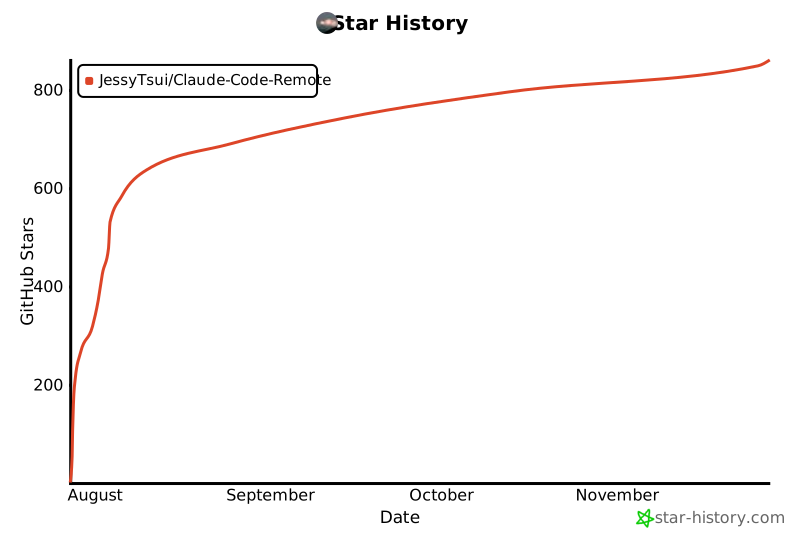](https://star-history.com/#JessyTsui/Claude-Code-Remote&Date)
|
|
|
|
⭐ **Star this repo** if it helps you code more efficiently!
|
|
|
|
> 💡 **Tip**: Enable multiple notification channels for redundancy - never miss a Claude completion again!
|